If you’re a beginner just starting out with the IUX platform and looking for a simple way to place Buy or Sell orders on the trading web interface, this article will walk you through the process step by step—with clear guidance designed specifically for new traders and easy to follow right away.
Before we begin, if you're not yet familiar with the basics of Buy and Sell orders,
We recommend reading this article first: What Are Buy and Sell Orders?
Getting Started with IUX Before Placing Buy and Sell Orders
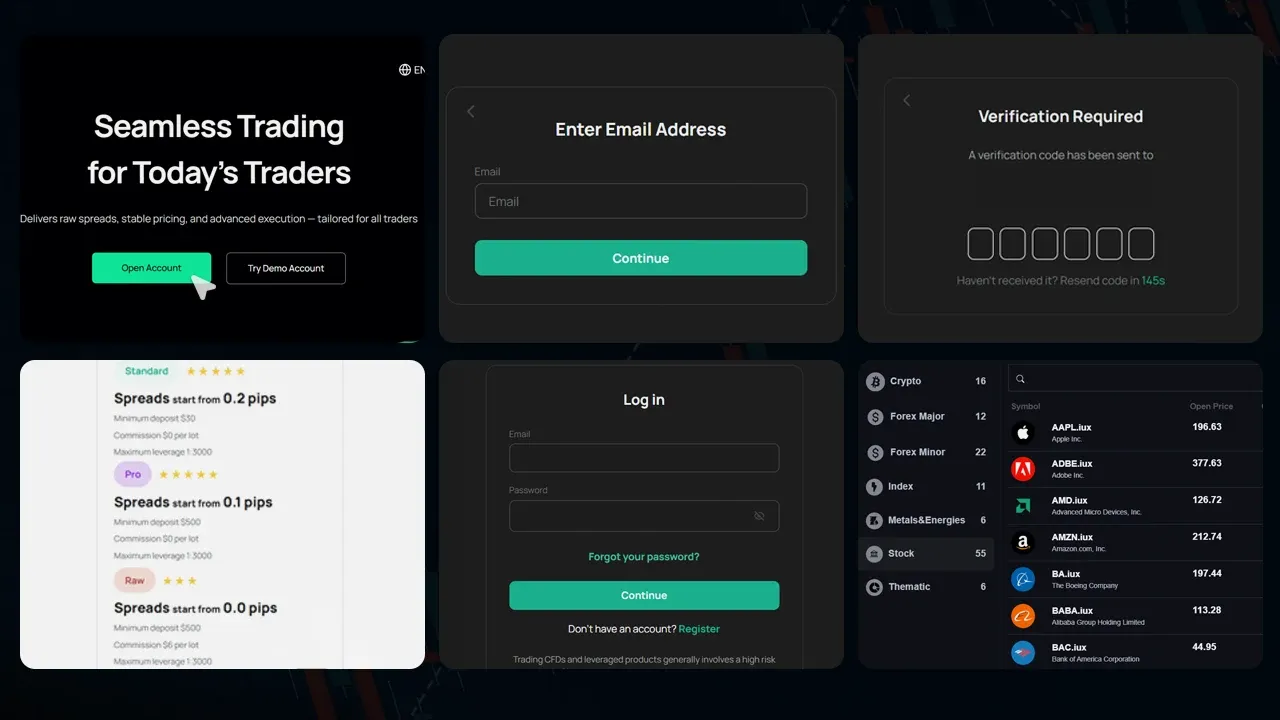
Before you can place a Buy or Sell order on IUX, you’ll need to complete a few basic steps:
1. Open a trading account with IUX
Visit the IUX website to register, fill in your personal information, and complete the identity verification process.
2. Choose the account type that suits you
- Standard Account – Lowest minimum deposit, easy to use, no commission, but slightly higher spreads. Ideal for beginners.
- Pro Account – Low spreads with zero commission. Suitable for general traders looking for lower overall trading costs.
- Raw Account – The lowest spreads available. Designed for professional traders, technical strategies, and high-frequency trading. Commission applies.
3. Log in via Web Trader or the IUX Trade app
IUX supports trading via both web and mobile applications, allowing you to trade from any device.
4. Choose the asset you want to trade
IUX offers a wide range of instruments including Forex, gold, stocks, commodities, and indices.
|
|
Tip : If you're unsure which account to choose, start with a demo account to practice and build confidence before trading live. |

Articles You Might Be Interested In:
What’s the Difference Between Leverage and Margin?
Steps to Place Buy/Sell Orders (Market and Pending Orders)
On IUX, you can place two main types of orders:
1. Market Execution (Instant Buy/Sell Orders)
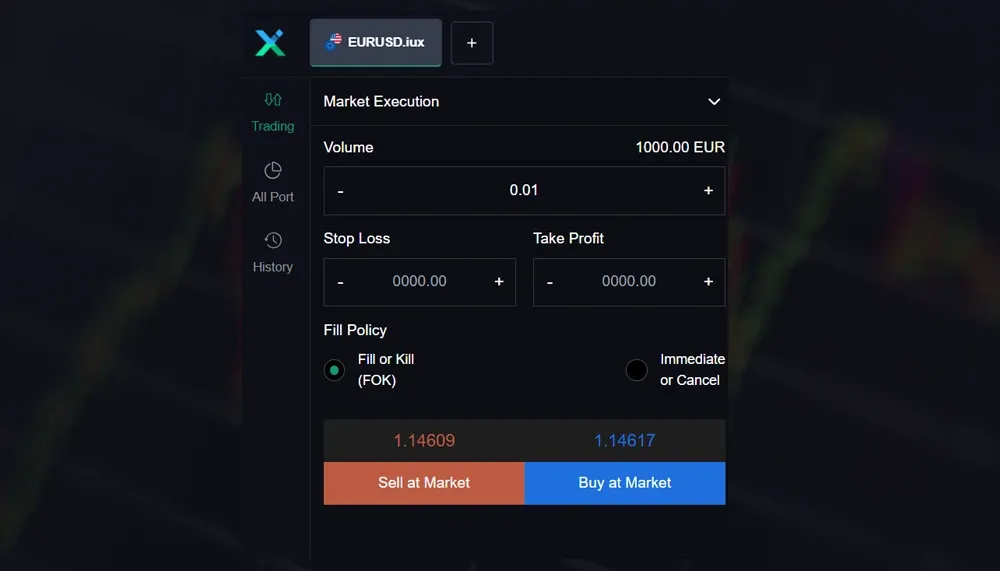
If you want to open a trade immediately at the current market price, follow these steps:
- Select the asset you want to trade (such as Gold or EUR/USD)
- Click "Buy" if you expect the price to rise, or "Sell" if you expect it to fall
- Set your Lot size, and configure your Stop Loss (SL) and Take Profit (TP)
- Confirm the order to execute the trade
2. Pending Order (Buy/Sell at a Specific Price)
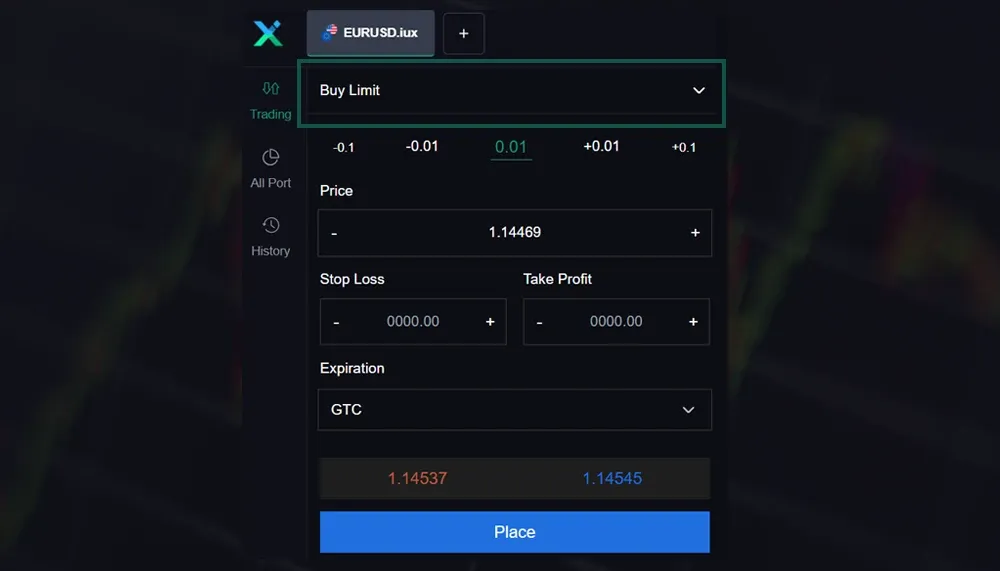
Pending Order (Buy/Sell at a Specific Price)
- Buy Limit: Used when you want to buy at a price lower than the current market price. For example, if you expect the price to drop to a certain level before bouncing back, you can place a buy order in advance at that lower price.
- Sell Limit: Used when you want to sell at a price higher than the current market price. For instance, if you believe the price will rise to a certain point before reversing downward, you can set a sell order at that higher level.
- Buy Stop: Used when you want to buy once the price rises to a certain level. This is typically based on the idea that if the price breaks a resistance level, it could signal a bullish trend, so you place a buy order above the current price.
- Sell Stop: Used when you want to sell once the price drops to a certain level. This is often used when you believe a break below a support level signals a bearish trend, so you set a sell order below the current price to trigger automatically.
Steps to Set a Pending Order
- Select the type of Pending Order from the menu
- Choose the order type (in this example, it's a Buy Limit)
- Enter the desired entry price, SL/TP, and Lot size
- Click "Place" to confirm the order
|
|
Tip : Before placing a Pending Order, always check support and resistance levels. Setting Buy Limit or Sell Stop at the wrong spot can trigger trades too early and cause avoidable losses. |
Now you know all the steps to place Buy and Sell orders on the IUX platform.
As you can see, even beginners can start trading with confidence—if they have a solid foundation and understand how to use each order type correctly.
If you’re still unsure which account type to start with, try using a Demo Account first. It lets you practice placing real orders without any risk, so you can switch to a live account when you're ready.
Remember, successful trading isn’t just about hitting Buy or Sell at the right moment.
It comes from disciplined planning, setting SL/TP carefully, and choosing a Lot size that fits your portfolio.
Start trading on IUX today and build your investment journey with us.

Articles You Might Be Interested In:
What Is a Pending Order? How to Use Buy Limit and Sell Stop the Right Way
What Are Stop Loss and Take Profit? How to Set SL/TP to Limit Losses and Lock In Profits
Tips for Using Buy/Sell Orders Safely and Effectively
While placing a Buy or Sell order may seem simple, proper planning is key to trading success. Here are important points every trader should keep in mind:
Don’t Trade Without Setting SL/TP
If the market moves against you, you could lose your capital without these protective tools.
Learn Basic Analysis Before Opening a Trade
Use tools like candlestick charts and support/resistance levels to guide your decisions.
Use a Lot Size That Fits Your Portfolio
Trading with oversized lots increases your risk significantly.
Start with a Demo Account Before Using Real Funds
This helps you understand the platform and test your strategies with zero risk.
Read more about Trading Psychology and Risk Management.
Note: This article is intended for preliminary educational purposes only and is not intended to provide investment guidance. Investors should conduct further research before making investment decisions.